


1. So first off we are gonna download DXVK on the right side of the screen you will see releases select the latest version they have available. 2. Open the file using Winrar navigate too dxvk-1.9.2.tar.gz\dxvk-1.9.2\x32 Extract all the d3d__.dll files and dxgi.dll to your SREmu(default name for Sentinels Republic swg folder) C:\SREmu(default Sentinels Republic swg folder) That's it if you wanted just the Vulkan part.
For reshade part:
1. Download reshade.me run reshade setup, click "click here to select a game and manage its reshade installation"
2. Click "Browse..." find the installation folder of your Sentinels Republic swg(default path: C:\SREmu ) select SWGEmu.exe 3. Select Vulkan.
4. It will ask you for the effect you want just hit "uncheck all" and "check all" and it will download all the effects and that's it.
5. When you open the game hit key "Home" on keyboard. My preference is DELC_Sharpen,Deband,Debanding,Dehaze and prod80_03_FilmicTonemap or HDR works too. The sharpening might need some adjustment. Also after you are done select "Performance Mode" on bottom right. Or download my ReShadePreset.ini and place it in your Sentinels Republic swg(default path: C:\SREmu ) and hit replace.
Problems:
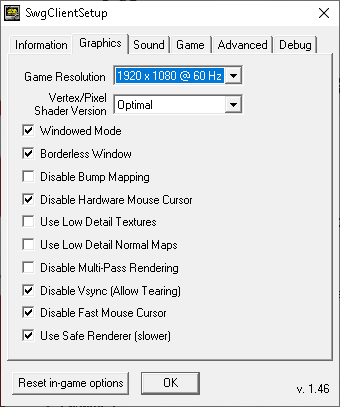
1. You might get a problem where you can't see your mouse you will need to go into "SWG OPTIONS" under the tab of graphics on the launcher and select "Disable Hardware Mouse Cursor"
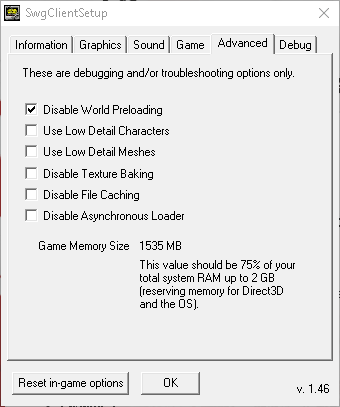
2. When you die the game might crash if you don't have "Safe Renderer (slower)" and random crashes without "Disable world preloading" in Advanced tab.
Also before and after pictures of reshade: after my swg options
Optional for nvidia users have "image sharpening" feature in Manage 3D settings this helps old games look at loot better without messing with the files.
https://www.techarp.com/games/nvidia-im ... ing-guide/